
Sleep Calculator1.6.2 - Google Play
You'll be able to see results in few seconds.
Publisher Description
Sleep Cycle Calculator helps you figure out when to go to sleep, and when to wake up, in order to feel rested, energized and refreshed and avoid the morning groggy feeling.
This is a free sleep app that can set an alarm for you to wake up in-between sleep cycles in order to start the day relaxed and with a clear mind.
Every time you go to sleep, you experience a series of sleep cycles that last on average 90 minutes, and waking up during one of the sleep cycles makes you feel groggy and exhausted even with plenty of hours of sleep - sleep cycle calculator tries to determine the best wake up times, or go to bed time in order to workaround this situation.
Perfect at figuring out sleep cycles and recommended for people who have trouble sleeping and don't have a fixed sleeping schedule.
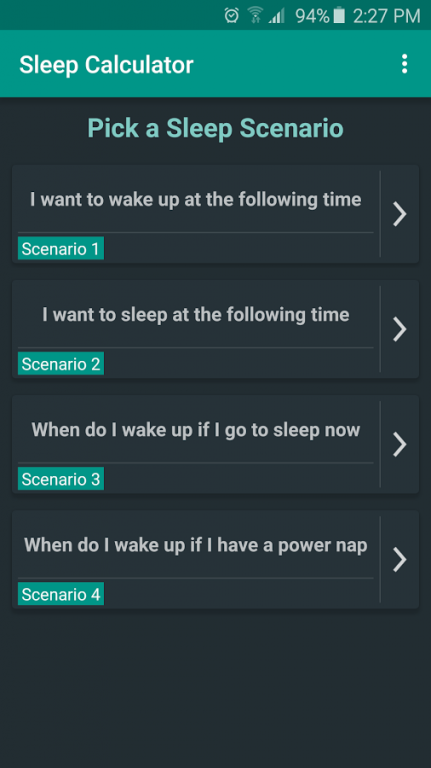
There are four sleep calculation scenarios to choose from:
Scenario 1: you want to know when to go to sleep in order to wake up at a specified time. Sets a go to bed alarm.
Scenario 2: you want to know when to wake up if you go to bed at a specific time. Sets a wake up alarm.
Scenario 3: you want to know the best times to wake up if you go to sleep right now.
Scenario 4: you plan to take a power nap and you want to know when you should wake up.
What this app does
• This Sleep Calculator app is the Android companion of the website https://sleep-calculator.com/
• Calculates when you should wake up and when you should go to sleep in order to wake up in-between sleep cycles.
• Calculates when you should wake up if you were to go to sleep now or take a power-nap.
• Calculates a list of possible "go to bed" or "wake up" times depending on your needs.
• The app is able to add alarms to the default Android Alarm app by selecting a time entry available in the sleep cycles list.
• Sleep Calculator provides a settings option to take into account the time it takes for you to fall asleep (default: 14 minutes).
• Sleep Calculator provides a settings option to take into account the length of a sleep cycle (default: 90 minutes).
• The clock hour format used by sleep calculator is the devices current system setting (24 hours format or the AM/PM format).
What this app does not
It's not an alarm clock app replacement, it only allows you to add an alarm to your Android stock alarm clock app.
Translators: help translate Sleep Calculator in your language so others can enjoy it too! Join the translation project here: https://sleepcalculator.oneskyapp.com/collaboration
Keep in touch
Facebook: https://www.facebook.com/sleepcyclecalculatorapp/
Uservoice: http://sleepcalculator.uservoice.com/
Android version support: 4.1+
Permissions:
SET_ALARM - Allows you to quickly set alarms based on when you want to wake up.
INTERNET - AdMob Ads and statistics.
About Sleep Calculator
The company that develops Sleep Calculator is Thinkpozzitive. The latest version released by its developer is 1.6.2.
To install Sleep Calculator on your Android device, just click the green Continue To App button above to start the installation process. The app is listed on our website since 2016-12-18 and was downloaded 0 times. We have already checked if the download link is safe, however for your own protection we recommend that you scan the downloaded app with your antivirus. Your antivirus may detect the Sleep Calculator as malware as malware if the download link to com.cycle.sleepcalculator is broken.
How to install Sleep Calculator on your Android device:
- Click on the Continue To App button on our website. This will redirect you to Google Play.
- Once the Sleep Calculator is shown in the Google Play listing of your Android device, you can start its download and installation. Tap on the Install button located below the search bar and to the right of the app icon.
- A pop-up window with the permissions required by Sleep Calculator will be shown. Click on Accept to continue the process.
- Sleep Calculator will be downloaded onto your device, displaying a progress. Once the download completes, the installation will start and you'll get a notification after the installation is finished.
Program Details
System requirements
Download information
Pricing
Version History
version 1.6.2
posted on 2016-12-18
Changelog 1.6.2:,• Pull to refresh calculations on Scenarios 3 & 4,• Cycles list animation,• Bug fixes and performance improvements,Changelog 1.6.1:,• Added themes support. You can choose between 7 different light / dark themes.,• Added multi language support. Now you can choose the app language from the available app translations.,• Bugfixes
Disclaimer
Official Google Play Link
We do not host Sleep Calculator on our servers. We did not scan it for viruses, adware, spyware or other type of malware. This app is hosted by Google and passed their terms and conditions to be listed there. We recommend caution when installing it.
The Google Play link for Sleep Calculator is provided to you by apps112.com without any warranties, representations or guarantees of any kind, so access it at your own risk.
If you have questions regarding this particular app contact the publisher directly. For questions about the functionalities of apps112.com contact us.
